
You did the hard part. You locked your character in stills, with a reference image or a trained model, the way we walked through in keeping one character consistent across a hundred shots. The face is right, the wardrobe is right, every frame looks like the same person. Then you drop that perfect still into a video model, hit generate, and watch the face you fought for slowly melt over four seconds. The jaw shifts, the beard thins, and the person who walks out of the shot is a cousin of the one who walked in.
Motion is a different problem from stills, and most people meet it the hard way. The good news: almost none of the fix is about better prompting. It is about one decision you make before you generate anything, and a handful of production habits that keep identity from leaking out frame by frame. Get the first one right and you are most of the way there.
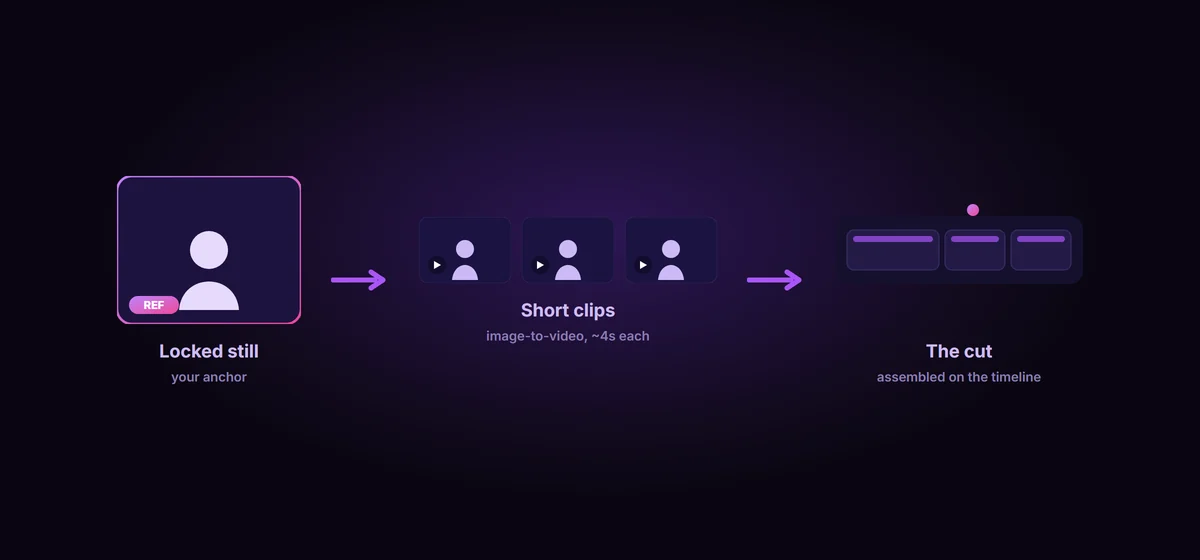
This is the single biggest lever in AI video, and it is the one most people skip. There are two ways to make a clip: text-to-video, where you describe the shot and the model invents everything, and image-to-video, where you hand the model a starting frame and it animates from there. For character work they are not close.
Text-to-video generates a brand new interpretation of “your character” every single time. Run it three times and you get three people with similar haircuts. The model has nothing concrete to hold; it is re-rolling the dice on the face with every clip.
Image-to-video starts from the exact still you already locked, so the clip inherits that face, that hair, that wardrobe, pixel for pixel at the first frame. The consistency work you did in stills is not separate from your video work. The approved still you built last time is your start frame. So the rule is simple and nearly absolute: when the character matters, always go image-to-video from your locked still, never pure text-to-video. The prompt then only needs to describe the motion, not reinvent the person.
Even from a perfect start frame, identity drifts as the clip runs, and the drift is a function of time. Around four seconds it holds. Push to eight and the second half starts to wander, because every generated frame is a small step away from the last and the errors compound. The longer the take, the more room the face has to walk off.
So stop trying to win one long, perfect take. Treat the model as a shot generator, not a single-take camera. A thirty second scene is not one thirty second roll, it is six five-second shots, each one starting from a clean frame and cut together in your editor. This is exactly how real film is shot, in short setups, and it is the cheapest consistency insurance you have in video. Short clips give drift no time to accumulate, and cutting between them is free.
If your tool supports it, anchor both ends: set a first frame and, where available, a last frame, so you control where the character starts and finishes and your cuts line up cleanly from shot to shot.
Short clips solve drift inside a shot. The harder problem is across shots: generate twenty clips and, without help, the character on clip twenty is a different person than clip one. Two habits keep identity carrying from shot to shot.
- Frame-chaining. After you generate a clip, scrub to a frame where the face is clean and clearly visible, export it, and use that frame as the start frame for the next shot. Each shot hands the next one a true picture of your character. This single habit cuts cross-shot drift more than anything else.
- Reference images. Where the model accepts them, feed three to five references of your character from different angles: front, three-quarter, profile, full body. Kling builds a geometric model of the character from multi-angle uploads to fight drift, Vidu takes up to seven reference images, and Veo and Seedance now bundle reference inputs as standard. Some tools, like Sora, let you define a reusable character once and drop them into different shots within a session.
And the unglamorous habit from the last post still applies in motion: keep your character bible, the exact same wording for wardrobe and features, locked in the prompt. The reference carries the face, the words carry the details the model forgets.
No model lands a perfect character on every clip, and chasing that is a trap. The edit is part of the consistency pipeline, not a place to hide failures.
Three habits carry the most weight. First, generate two or three takes of every shot and pick the best one. It is cheap insurance and it is what experienced creators quietly do on every clip. Second, when the motion is perfect but the face slipped, run a face restore or face swap on the key frames in post instead of burning another full generation on the whole shot. Third, cut on the drift: a clean cut at the moment a face starts to wander hides it completely, and the viewer never sees the wobble. Lock the quality of your keepers with an upscaler like Magnific (Freepik) so detail holds when it hits the timeline. The goal is a character who holds across the cut, at the speed a viewer actually watches, not one who survives a frame-by-frame microscope.
Pick a model that is actually good at this
Image-to-video and reference support vary a lot between models, and the leaderboard moves monthly, so test on your own character before you commit a project. As of mid-2026, the honest lay of the land:
- Kling is the strong default for character work. It is predictable, holds character and object consistency even through fast camera moves, and its multi-shot mode plus multi-angle reference uploads are built for exactly this problem.
- Runway Gen-4 and 4.5 are the pro pick when you want granular control, with a motion brush and reference-driven character consistency.
- Veo holds a subject well but performs best when the source image has one clear focal subject rather than a cluttered frame.
- Hailuo and Seedance sit near the top of the image-to-video leaderboards, with stable subject tracking and, in Seedance, a universal reference input for character.
- Sora offers reusable characters that are convenient within a single session.
The pattern across all of them: the model is only as consistent as the frame and references you feed it. Pick the one that handles image-to-video and references well, then prove it on your character, not on a demo reel.
The multi-shot reality
It is worth being honest about where this actually stands. For the first couple of years of AI video, every clip was an island. You could generate a beautiful five second shot, but the moment you generated a second one, you were looking at a stranger. That is mostly solved now, but not by a single magic button. It is solved by stacking the habits above: image-to-video from a locked still, short clips, frame-chaining, reference images, generate-and-pick, and assembly in the edit. Research is pushing toward native multi-shot models that hold a character across cuts on their own, but for work you are shipping today, consistency in motion is still a craft of anchoring and stitching, not a setting you flip on.
Where to go from here
The whole thing rests on one idea: in video, the still is the anchor and motion is what you do to it. Lock the character in a clean frame, animate from that frame with image-to-video, keep every shot short, chain a clean frame into the next shot, lean on references, and clean up the rest in the edit. Do that and one character will walk through an entire video as the same person, instead of slowly becoming someone else.
BatchFrames gets your character to the video model intact
You bring the locked character and the video tool. BatchFrames turns your script into shots, keeps each character worded identically across every one with @mention tags, and routes the approved stills, your image-to-video start frames, grouped by character straight into the image and video tools you already use.
In the next post we will follow the character all the way to the finish line: routing an approved set of shots and their characters out of your script and into your image and video tools without the copy-paste chaos that eats an afternoon.